LUTRON SINGLE LINK HOMEWORKS® QS PROCESSOR, CONNECT BRIDGE, HYBRID REPEATER AND TWO QSPS-P3 POWER SUPPLIES

LUT-HQRK-CONNECT-UK

The most cost effective solution to getting started with HomeWorks® QS, this incredible bundle includes a Single Link HomeWorks® QS Processor, Connect Bridge, Hybrid Repeater and two QSPS-P3 power supplies. This HomeWorks® QS starter kit provides control and communication to HomeWorks® QS system components.

The most cost effective solution to getting started with HomeWorks® QS, this incredible bundle includes a Single Link HomeWorks® QS Processor, Connect Bridge, Hybrid Repeater and two QSPS-P3 power supplies.

This HomeWorks® QS starter kit provides control and communication to HomeWorks® QS system components.

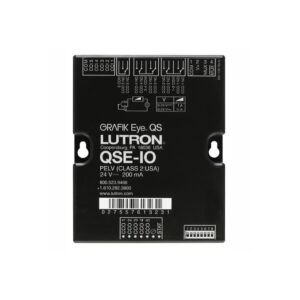
Single Link HomeWorks® QS Processor 

The HomeWorks® QS processor provides control and communication to HomeWorks® QS system components. The ethernet link allows communication to the HomeWorks® QS software, integration with third party systems and communication between multiple processors. HomeWorks® QS processors may be connected using either standard networking or using adhoc networking. All processors on a project must be connected to a single network. Also The HomeWorks® QS software and all integration equipment must be connected to the same network as the processors.

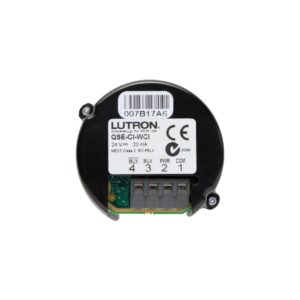
Lutron Connect Bridge 

The Lutron Connect Bridge creates a link between HomeWorks® QS and the cloud enabling control, integration and monitoring of a HomeWorks® QS system from a smart phone or tablet using the Lutron Connect app.

Hybrid Repeater

Homeworks® QS Hybrid Repeaters add wireless Radio Frequency (RF) communication and extend the range of RF signals that are sent between dimmers, switches, keypads, visor control receivers, shades and drapes and other devices. Repeaters ensure error free communication between system components and prevent interference from neighbouring systems.

QSPS-P3 Power Supply 

The QS Link Plug In Power Supply provides power to Lutron QS shading solutions as well as QS system devices and interfaces. The power supply plugs into a standard receptacle and delivers 35 VDC output voltage which conforms with NEC® Class 2 / PELV.

FEATURES

Single Link HomeWorks® QS Processor 

  • Each HomeWorks® QS 1 Link processor has one link that can be configured as one of four types
  • HomeWorks® QS Power Panels 16 interfaces/256 zones
  • HomeWorks® QS Wired Device Link 99 devices/512 zones
  • HomeWorks® QS RF Link 99 devices/100 zones
  • HomeWorks® H48 Wired Dimmers 4 interfaces/192 zones 
  • The HomeWorks® QS processor can be installed in an L-LV21 or L-LV14 or DIN panels with control compartments 

Lutron Connect Bridge

  • Works with the Lutron Connect app (Android® and iOS®)
  • Provides remote access for control and monitoring of system via Lutron Connect app 1,2 
  • Timeclock syncing to always ensure accurate system time
  • Compatible with Apple HomeKit technology for up to 99 zones 2
  • Uses Siri voice control to adjust lights and shades
  • Sonos® endorsed integration 3
  • Integrates with Amazon® Alexa® enabled devices 4
  • Supports geofencing from the Lutron Connect App 

1 The Lutron Connect Bridge is required when using the Lutron Connect app. The Lutron Connect App is compatible with iOS devices version 9.0 or later and Android devices 4.1 (Jellybean) or later. 
2 To control this HomeKit-enabled accessory, iOS 9.0or later is recommended. Communication between iPhone, iPad, or iPo d Touc h and HomeKit-enabled Connect Bridge is secured by HomeKit technology. Controlling this HomeKit-enabled accessory automatically and away from home requires an Apple TV with tvOS 10.0 or later or an iPad with iOS 10.0 or later set up as a home hub.  
3 A working internet connection, Lutron Connect Bridge, Lutron Connect App 2.0 or newer and Sonos app are required.
4 A working internet connection, Lutron Connect Bridge, and Lutron Connect App 3.0 or newer are required.

Hybrid Repeater

  • Test Button: Enters the RF Repeater test mode 
  • Activate button: Provides repeater activation within the system
  • RS485 port to connect to the HomeWorks® QS RF link and to other repeaters through a wired link (daisy-chain) 

QSPS-P3 Power Supply

  • NEC® Class 2 / PELV power supply capable of powering Lutron shades, drapes drive units, keypads and accessories
  • Mounting tabs and small size allow for discrete installation
  • Simple wiring topology to connect QS communication between shades and other QS devices/system components
  • Includes AC power cord 

SPECIFICATIONS

Link Processor Connect Bridge Hybrid Repeater Power Supply
Power 24 to 36V- 250mA maximum 5V- 300m
Cable length 18.3m / 6ft
DC adapter: 9V- 300mALink:
24 V- 50mADC adapter:
Input: 100 to 240V~ 50/60Hz 6.5W
Output: 9V- 300mA
Input: 120 to 240V~ 50/60Hz  1.2A
Output: 35V-  0.143A  5 W
Capable of powering any one Lutron QS window treatment drive OR up to 8 QS PDU’s 
Typical Power Consumption 5 W
8 Power Draw Units (PDUs)Test conditions: Ethernet link connected and device link in use
1.3 W
Test conditions:
LED on, Ethernet cable plugged in, powered by the 5V- power supply
0.6 W
Test conditions:
One LED on, powered by a 9V- adapter
–
Heat Generated 17 BTU/hr
Typical (24 BTU/hr maximum
– Unit generates heat, maximum 4 BTU/hr Thermal dissipation 4.5 BTU/hr
Cooling Method Passive cooling – – –
Communications Ethernet, RS485 (QS, RF, Power Panel) Internet connection is required for initial setup, to maintain system date / time, for remote access from the Lutron Connect app, and to receive periodic firmware updates.

Network connection to Radio RA2 main repeater or HomeWorks QS processor is required.

Not a wireless device.

The first Hybrid Repeater communicates with the HomeWorks QS processor on the RF wired link.

Subsequent Repeaters may be wired on this link or may communicate over Radio Frequency (RF).
All RF devices must be located within 9m / 30ft of a Repeater.

All Repeaters must be within 18m / 60ft of another Repeater.

–
Environment Indoor use only
0°C / 32°F to  40°C / 104°F
0% to 90% humidity, non condensing
 
Indoor use only
0°C / 32°F to 40°C / 104°F
0% to 90% non condensing humidity


Indoor use only
0°C / 32°F to 40°C / 104°F
0% to 90% non condensing humidity
Indoor use only
0°C / 32°F to 40°C / 104°F
0% to 90% non condensing humidity
Not approved for plenum installation
Dimensions With terminal blocks:
Height: 143mm / 5.63″
Width: 108mm / 4.27″
Without terminal blocks:
Height: 134mm / 5.26″
Width: 108mm / 4.27″
Height: 69.9mm / 2.75″
Width: 69.9mm / 2.75″
Depth: 30.2mm / 1.19″
Height: 133mm / 5.25″
Width: 108mm / 4.25″
Depth: 27mm / 1.06″
Height: 103mm / 4″
Width: 70mm / 2.75″
Depth: 32mm / 1.25″                
Regulatory Approvals Complies with: UL508, CSA – C22.2 No.14, IEC / EN 60669, NOM cULus® listed
certified for IEC / EN compliance
CE marked
FCC, IC, COFETEL, CE, CCC, TRA, CTICK, ANATEL, IDA, SUPERTEL, SUTEL cULus Listed
IEC Compliant (CE Marked)
NOM Certified
FCC Compliant
CCC Certified

Share

We use cookies to personalise content and ads, to provide social media features and to analyse our traffic. We also share information about your use of our site with our social media, advertising and analytics partners. View more
Cookies settings
Accept
Do not accept
Privacy & Cookie policy
Privacy & Cookies policy
Cookie name Active

Who we are

Suggested text: Our website address is: https://wave-es.com/new.

Comments

Suggested text: When visitors leave comments on the site we collect the data shown in the comments form, and also the visitor’s IP address and browser user agent string to help spam detection. An anonymized string created from your email address (also called a hash) may be provided to the Gravatar service to see if you are using it. The Gravatar service privacy policy is available here: https://automattic.com/privacy/. After approval of your comment, your profile picture is visible to the public in the context of your comment.

Media

Suggested text: If you upload images to the website, you should avoid uploading images with embedded location data (EXIF GPS) included. Visitors to the website can download and extract any location data from images on the website.

Cookies

Suggested text: If you leave a comment on our site you may opt-in to saving your name, email address and website in cookies. These are for your convenience so that you do not have to fill in your details again when you leave another comment. These cookies will last for one year. If you visit our login page, we will set a temporary cookie to determine if your browser accepts cookies. This cookie contains no personal data and is discarded when you close your browser. When you log in, we will also set up several cookies to save your login information and your screen display choices. Login cookies last for two days, and screen options cookies last for a year. If you select "Remember Me", your login will persist for two weeks. If you log out of your account, the login cookies will be removed. If you edit or publish an article, an additional cookie will be saved in your browser. This cookie includes no personal data and simply indicates the post ID of the article you just edited. It expires after 1 day.

Embedded content from other websites

Suggested text: Articles on this site may include embedded content (e.g. videos, images, articles, etc.). Embedded content from other websites behaves in the exact same way as if the visitor has visited the other website. These websites may collect data about you, use cookies, embed additional third-party tracking, and monitor your interaction with that embedded content, including tracking your interaction with the embedded content if you have an account and are logged in to that website.

Who we share your data with

Suggested text: If you request a password reset, your IP address will be included in the reset email.

How long we retain your data

Suggested text: If you leave a comment, the comment and its metadata are retained indefinitely. This is so we can recognize and approve any follow-up comments automatically instead of holding them in a moderation queue. For users that register on our website (if any), we also store the personal information they provide in their user profile. All users can see, edit, or delete their personal information at any time (except they cannot change their username). Website administrators can also see and edit that information.

What rights you have over your data

Suggested text: If you have an account on this site, or have left comments, you can request to receive an exported file of the personal data we hold about you, including any data you have provided to us. You can also request that we erase any personal data we hold about you. This does not include any data we are obliged to keep for administrative, legal, or security purposes.

Where your data is sent

Suggested text: Visitor comments may be checked through an automated spam detection service.
Decline All
Save settings Accept All
Cookies settings